behavior_3D_Animation_Node
A downloadable tool for Windows
Simple Object Animator (Rotate & Bounce)
This CopperCube behavior is designed to bring static objects to life. It provides a simple way to create "idle" animations, such as rotating coins, floating power-ups, or hovering indicators. It allows you to combine a continuous rotation with a smooth "bouncing" (sine-wave) movement along a specific axis.
Parameters
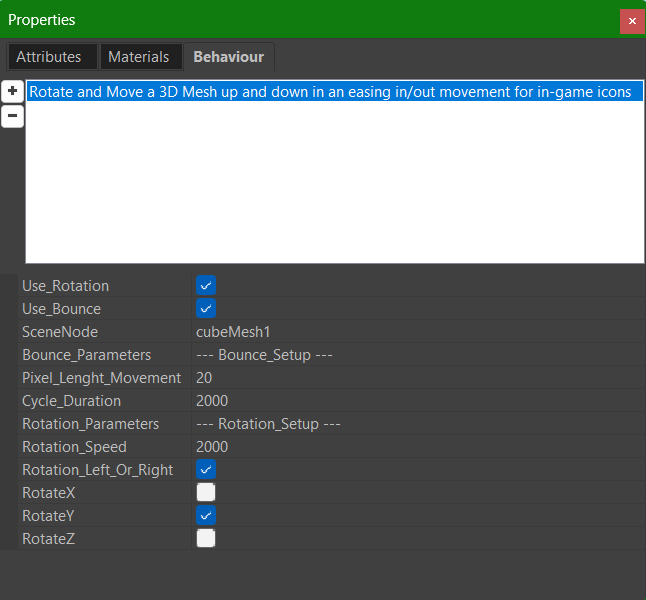
--- General Setup ---
- Use_Rotation (bool, default = true) Enable or disable the rotation effect.
- Use_Bounce (bool, default = true) Enable or disable the floating/bouncing movement.
- Scene_Node (scenenode) The target mesh to animate. Required.
--- Bounce Setup ---
- Bounce_On_Axis (string, default = "Y") The axis along which the object will move back and forth. Accepts "X", "Y", or "Z" (case insensitive).
- Pixel_Lenght_Movement (integer, default = 20) The total amplitude of the movement in 3D units. The object will move half this distance in one direction and half in the other relative to its starting point.
- Cycle_Duration (integer, default = 2000 ms) Time in milliseconds to complete one full up-and-down cycle.
--- Rotation Setup ---
- Rotation_Speed (integer, default = 2000 ms) Time in milliseconds to complete a full 360-degree rotation. Lower values mean faster rotation.
- Rotation_Left_Or_Right (bool, default = true)
- true → Rotates in the positive direction.
- false → Rotates in the negative direction.
- Rotate_X / Rotate_Y / Rotate_Z (bool) Select which axes to apply the rotation to. You can combine multiple axes for complex tumbling effects.
Behavior
- Initialization: On the first frame, the script captures the object's original position and original rotation. All movements are calculated relative to these starting coordinates.
- Bounce Logic: Uses a generic Sine Wave function based on the
Cycle_Duration. This ensures a smooth, organic floating motion rather than a linear mechanical movement. - Rotation Logic: Applies a continuous rotation based on the elapsed time and
Rotation_Speed. - Loop: The animation runs continuously as long as the scene is active.
Example Use Cases
- Collectibles: Create a classic spinning gold coin that floats slightly up and down (Use Rotate_Y and Bounce_On_Axis = Y).
- 3D UI Indicators: Make a floating arrow point at an objective by bouncing it on the Y-axis without rotation.
- Propellers/Fans: Use Use_Bounce = false and Rotate_Z to make a fan blade spin at a constant speed.
Download
Click download now to get access to the following files:
Development log
- 🚧 Plugin Update Info96 days ago
Comments
Log in with itch.io to leave a comment.
A very useful little plugin, thank you!
Thank you for your support friend 🙂.
Awesome project from you,once again!! 🙂🙏
Thank you, however I forgot to add something to this plugin, so an update is expected.
Whiii, how fun!
Haha, glad you think so! 🎉 I had a blast working on it — hope it brings even more fun to your CC adventures!